T3 Code alternative: a native Mac terminal instead of a control plane
T3 Code is the open-source control plane for coding agents from T3 Tools: a desktop app, a web app and iOS and Android apps that drive Claude Code, Codex, Antigravity, OpenCode, Cursor and Grok through their SDKs. Every thread gets its own branch, and a button commits, pushes and opens a pull request with a generated title. It's free, MIT-licensed and moving fast.
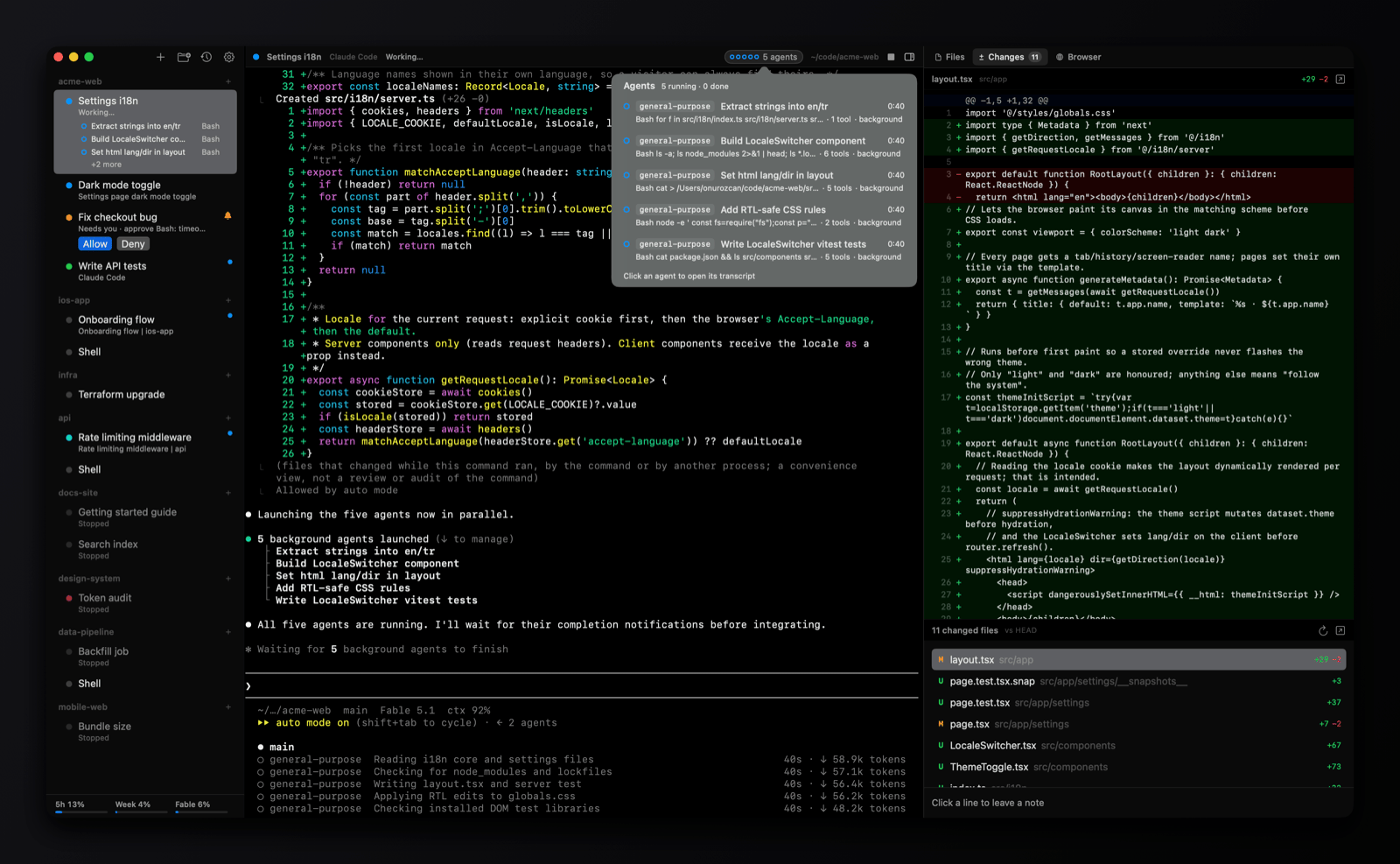
omux is smaller and closer to the metal. It's one native Swift window, about 5 MB, that runs the real Claude Code and Codex terminals side by side under projects, reads their own signals for status, and puts Allow and Deny in the sidebar. No server, no Electron, no reimplemented chat view. This page is a fair look at which shape fits you.
- 5 MBnative Swift app, no Electron
- 0accounts, credits or telemetry
- 6sessions side by side per project
- MITfree and open source
Where the agent lives
working needs you done
Side by side
| omux | T3 Code | |
|---|---|---|
| What it is | A session manager with a real terminal per Claude Code or Codex session | A control plane that drives agent harnesses through their SDKs, one chat-style thread per task |
| Runs on | macOS, native Swift, about 5 MB | macOS, Windows and Linux desktop (Electron), web, iOS and Android |
| Agents | Claude Code and Codex, plus plain shells | Claude Code, Codex, Antigravity, OpenCode, Cursor and Grok, with more added often |
| How you see the agent | Its own terminal UI, exactly as in Terminal | A thread view rendered by T3 Code; a terminal is available too |
| Agent status | ✓ working, needs you, done, read from the agents' own signals | ✓ per thread, with push notifications on the phone apps |
| Answer a permission prompt | Allow and Deny buttons in the sidebar and header, without switching | ✓ inside the thread |
| Subagents | Listed under the session with transcripts | Shown inside the thread |
| Git | Optional worktree per session, pull request status, merge and clean up | A branch per thread, one-button commit, push and PR with generated titles; draft and stacked PRs |
| Diff review | Changes panel with review notes sent to the agent | Inline diff review before pushing |
| Split panes | ✓ a resizable canvas per project, up to six sessions | ✕ |
| From your phone | ✕ | ✓ native iOS and Android apps that reach your machine |
| Scripting | ✓ omux CLI over a local socket | Not a focus |
| Maturity | Young, small and focused | Early by its own description, with a large community |
| Price and license | Free, MIT | Free, MIT |
See omux in 37 seconds
Pick T3 Code if
- You want to check on and steer agents from your phone, or from a browser on another machine.
- You run agents beyond Claude Code and Codex and want them all in one place.
- You like the branch-per-thread flow with generated pull requests and stacked PRs built in.
Pick omux if
- You want the real terminal UI of Claude Code and Codex, not a rendering of it, with status and permissions read from the agents themselves.
- You want a 5 MB native app with no server and no Electron, and split panes so several sessions share one project view.
- You prefer a worktree per session with the pull request's state and the diff right next to the agent.
What omux does for every session
- Projects with sessions under them, in a sidebar
- Shows whether each agent is working, needs you or is done
- Allow or Deny an agent's permission request without switching to it
- Lists a session's subagents and opens their transcripts
- Resumes each Claude Code and Codex conversation after a relaunch
- Git worktree per session, with pull request status and merge
- Files, Changes (diff with review notes) and Browser panels
- Claude and Codex plan usage limits in the sidebar
- Split panes: up to six sessions side by side per project, layouts saved
- An omux command line: list, status, send, new, close and wait on sessions
- macOS notifications with sound
Questions
Is T3 Code a terminal?
Not primarily. It talks to agents through their SDKs and shows each task as a thread, with a terminal available when you need one. omux is the other way round: every session is a terminal first, with the sidebar and panels built around it.
Can I use omux and T3 Code together?
Yes. They don't interfere, since each starts its own agent processes. Many people keep a desktop tool for focused work and a phone app for checking in.
Which one is more mature?
T3 Code has the larger community and ships often, and its own site says to expect bugs. omux is a younger, smaller project with a narrower scope. Read both changelogs and pick the one whose direction matches your work.
Also compared: Terminal alternative, tmux alternative, cmux alternative, Warp alternative, herdr alternative, VS Code alternative, Cursor alternative, Antigravity alternative, Devin alternative. Facts about T3 Code come from its public documentation as of 2026-11-02; if something is out of date, open an issue.