
Projects and sessions
A project is a folder; its sessions sit under it in the sidebar. Drag to reorder, rename, color. ⌘T starts a session, ⌘K jumps to one.
Sessions are grouped into projects in a sidebar, each one keeps its conversation across relaunches, and each can run in its own Git worktree. See which session is working, which one is done and which one needs you, and answer Allow or Deny without switching to it.
macOS 14 or later · free · MIT license · requirements
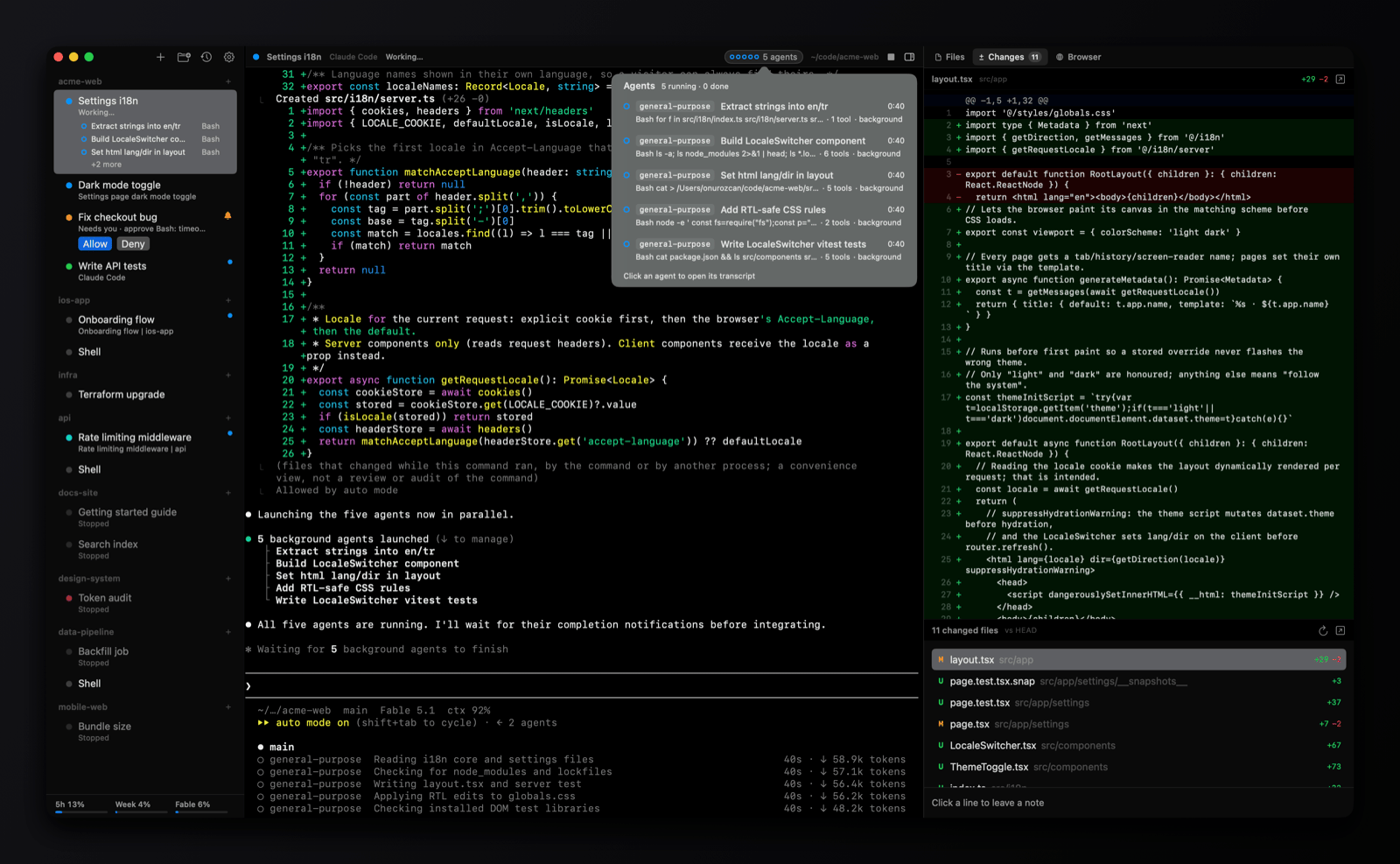
One window for every agent you have running. Each session is a real terminal with Claude Code or Codex in it; omux adds the things you keep checking by hand.
A project is a folder; its sessions sit under it in the sidebar. Drag to reorder, rename, color. ⌘T starts a session, ⌘K jumps to one.
Working, needs you, done: read from Claude Code's and Codex's own signals, not from guessing at the screen. The Dock badge counts sessions waiting on you.
When an agent stops to ask for a permission, Allow and Deny appear under the session and in its header. Answer from wherever you are.
A session running subagents lists them with what each one is doing. Click one to read its transcript in the side panel.
Every session is pinned to its own conversation. Quit, reopen, and it continues where it left off, for Claude Code and Codex alike.
⌥⌘T gives a session its own branch and folder, so parallel agents don't touch each other's files. A setup command can prepare each worktree first.
With gh installed, a worktree session shows its pull request's checks, reviews and merge state, creates the PR, merges it, and offers to clean up afterwards.
Preview what the session touches, read its diff and leave review notes that go back to the agent in one message, or open the local server it started and pick an element into the prompt. ⌘V pastes a screenshot as a file the agent can read.
A macOS notification with a sound when a session you aren't watching needs you. Your Claude or Codex plan limits in the sidebar, with a plain explanation when they can't be read.
Most terminals try to be everything. omux is one specific thing: the place where your coding agents run.
Not a generic multiplexer with agent hooks bolted on. omux understands the two agents it hosts: their status, permission prompts, subagents, conversation ids and plan limits come from the agents' own protocols.
SwiftUI and SwiftTerm, a 5 MB download, a window that launches in under a second and idles at nothing. It looks and behaves like a Mac app because it is one.
A sidebar, one terminal, three panels. No blocks, no command palette of AI features, no agent of its own. Your attention goes to the sessions, and the sessions tell you when they need it.
omux runs the Claude Code and Codex you already have, signed in the way they already are. No account, no credits, no middleman between you and the model.
Worktrees, branches and pull requests are first-class, so running five agents on one repo doesn't mean five agents editing the same files.
MIT-licensed, notarized by Apple, updated in place. No telemetry: the only network requests are the ones you can read about on this page.
A project or session can run Codex instead of Claude Code. Pick the agent in the project or session settings, in the worktree sheet, or with File › New Codex Session. omux starts a private Codex app-server per session and uses Codex's existing CLI login; it doesn't implement its own login or read Codex's credentials.
Needs Codex CLI 0.165 or later installed as codex. The app-server integration is experimental on the Codex side.
claude for Claude sessions; plain shell sessions work without itcodex, optional, for Codex sessionsGet the disk image from the latest GitHub release, open it and drag omux to Applications.
omux-0.6.1.dmgThe app is signed with a Developer ID and notarized by Apple, so it opens like any other download. A zip of the same build is attached to each release for scripts.
Needs Swift 6.2 or later (Xcode 26 or the Command Line Tools); the downloaded app needs no Swift. build.sh builds a release binary and replaces /Applications/omux.app, signed with your Apple Development certificate if you have one, ad hoc otherwise.
git clone https://github.com/onurozcan/omux.git
cd omux
./build.sh
open /Applications/omux.appHonest, side-by-side pages for people deciding between omux and the tools it's most often weighed against.
omux has no telemetry. It makes three kinds of network requests, all for features you can see:
/usage command uses. The token is never written to disk or logged.gh is installed, omux runs gh pr view for each worktree session's branch. gh uses its own login; omux never reads your GitHub token.omux.app/appcast.xml to see whether a newer version exists, and downloads it from GitHub only when you accept. Nothing about you or your machine is sent.The Privacy section of the README lists every local file omux reads or writes.