
Cursor alternative: run your own Claude Code and Codex, without credits
Cursor is an AI editor with its own agent runtime: the editor, Composer and a menu of frontier models, parallel agents that run in the cloud for hours, Bugbot for review, automations, and plans from a free tier up to Ultra. It's a platform, and a strong one if you want everything on one bill.
omux is a 5 MB window that runs the Claude Code and Codex you already have. No model menu, no credits, no account, no telemetry. The sessions sit under projects in a sidebar, show their status from the agents' own signals, and take Allow and Deny from one click. This page is for people who moved their agent work to the terminal and want to run many sessions without losing track.
- 5 MBnative Swift app, no Electron
- 0accounts, credits or telemetry
- 6sessions side by side per project
- MITfree and open source
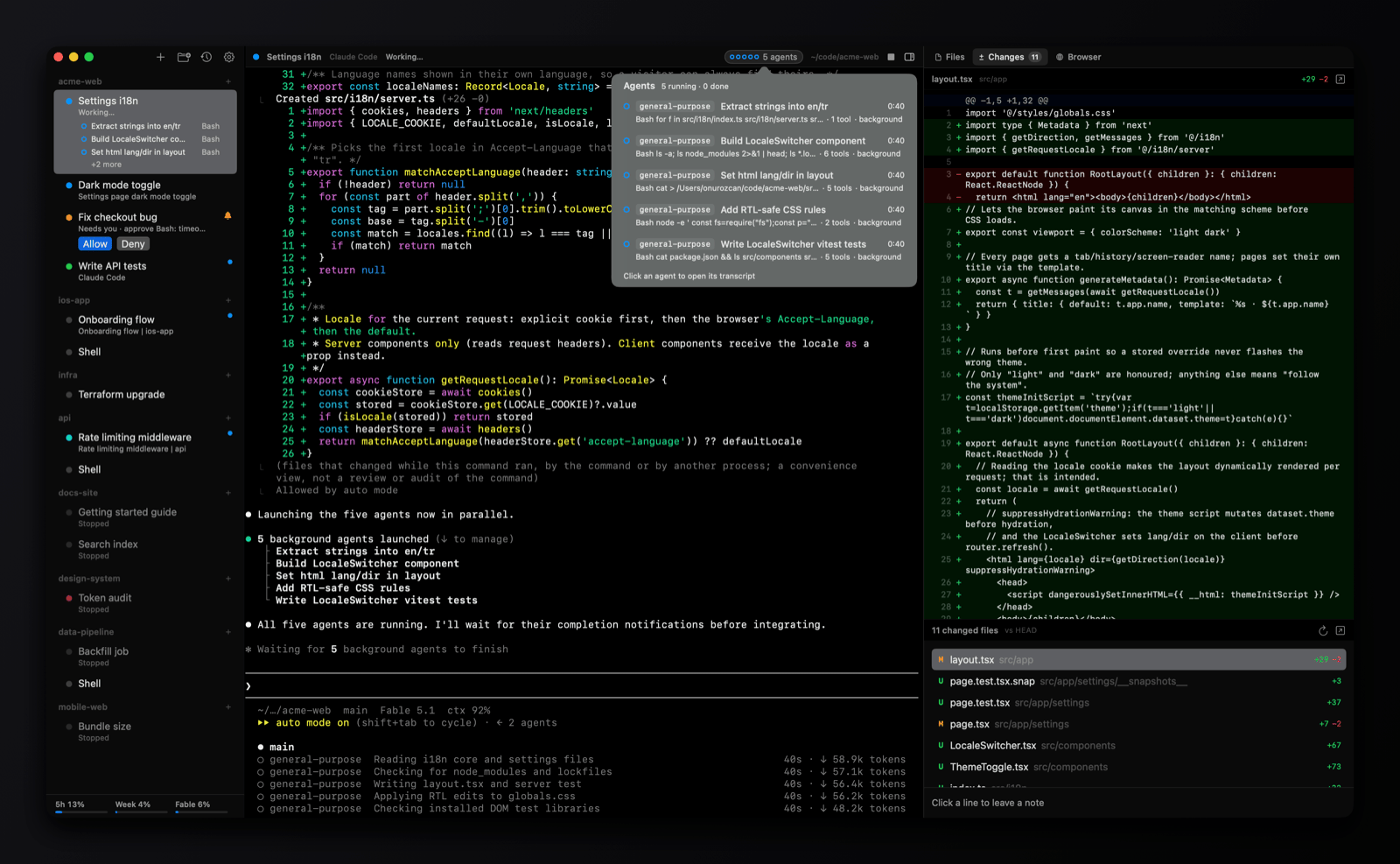
Where the agent lives
working needs you done
Side by side
| omux | Cursor | |
|---|---|---|
| What it is | A session manager for Claude Code and Codex | An AI code editor with its own agent, models and cloud |
| Runs on | macOS | macOS, Windows and Linux; web and mobile for cloud agents |
| Account and billing | None; you pay only your Claude or Codex plan | Cursor account; a free tier and paid plans by usage, with third-party models billed separately |
| Whose agent | Claude Code and Codex as installed, with their own logins | Cursor's agent with Composer and third-party models; a CLI as well |
| Many agents at once | ✓ sessions under projects, split panes per project | ✓ parallel agents and cloud agents |
| Agent status | Working, needs you, done, read from the agents' own signals | Task states in the editor and its planning view |
| Answer a permission prompt | Allow and Deny from the sidebar | In the agent panel |
| Subagents | Listed under the session with transcripts | Depends on the model and mode |
| Conversations after a restart | Each session resumes its exact conversation | Chats persist in the editor |
| Worktrees and pull requests | One worktree per session, PR status, merge and clean up | Worktrees for parallel agents; pull requests from cloud agents |
| Code review | Changes panel with notes sent back to the agent | Bugbot on GitHub and the diff view in the editor |
| Editing code | ✕ | Its whole purpose |
| Telemetry | None | Collected, with a privacy mode |
| Price and license | Free, MIT | Proprietary; free tier and paid plans |
See omux in 37 seconds
Pick Cursor if
- You want an editor and an agent in one product, with a choice of models on one bill.
- You want cloud agents that keep working for hours and come back with a pull request.
- You work on Windows or Linux.
Pick omux if
- You already pay for Claude Code or Codex and want a calm place to run many sessions of them on a Mac.
- You don't want another account, credit balance or telemetry.
- You want to see which session needs you and answer it in one click, with the diff and files beside it.
What omux does for every session
- Projects with sessions under them, in a sidebar
- Shows whether each agent is working, needs you or is done
- Allow or Deny an agent's permission request without switching to it
- Lists a session's subagents and opens their transcripts
- Resumes each Claude Code and Codex conversation after a relaunch
- Git worktree per session, with pull request status and merge
- Files, Changes (diff with review notes) and Browser panels
- Claude and Codex plan usage limits in the sidebar
- Split panes: up to six sessions side by side per project, layouts saved
- An omux command line: list, status, send, new, close and wait on sessions
- macOS notifications with sound
Questions
Can I use omux and Cursor together?
Yes. Cursor stays your editor; omux runs the terminal sessions. The Files panel in omux opens files in whatever editor you set as default.
Does omux have its own model or agent?
No. It runs Claude Code and Codex, which you install and sign in to yourself. omux never sees your prompts or keys.
Does omux cost anything?
No. It's MIT-licensed, the app has no paid tier, and there are no credits. Your only cost is the Claude or Codex plan you use with it.
Also compared: Terminal alternative, tmux alternative, cmux alternative, Warp alternative, herdr alternative, T3 Code alternative, VS Code alternative, Antigravity alternative, Devin alternative. Facts about Cursor come from its public documentation as of 2026-11-02; if something is out of date, open an issue.